Access Recovery
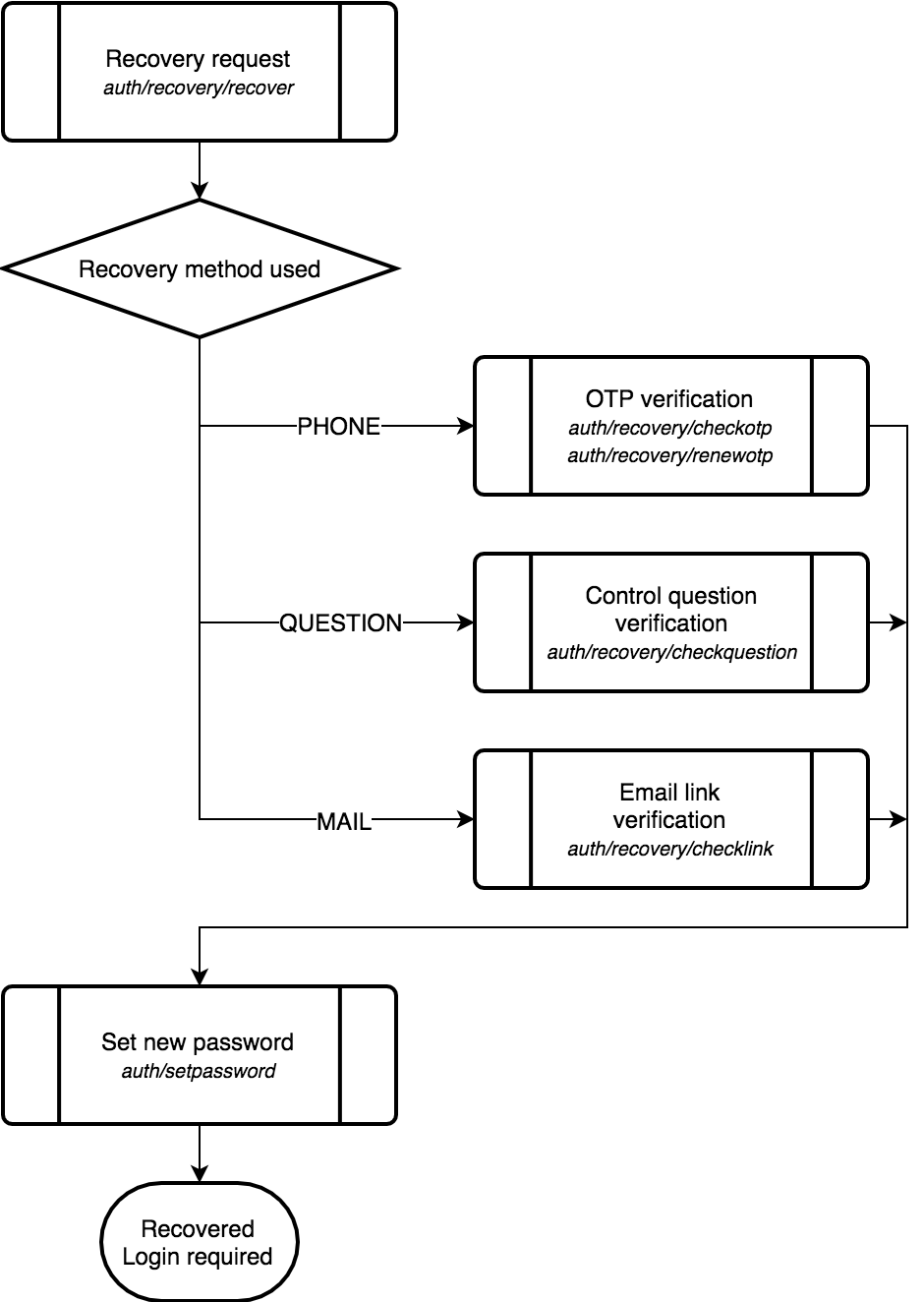
Recover Access
-
POST/(company_code)/v2/auth/recovery/recover¶ Recover user access
Verifies user login ID (can be primary phone, primary email, or a separate login name depending on user role) and captcha response for access recovery.
One or more of the following recovery methods may be allowed for a client application:
PHONE- User must have primary phone set. An SMS with one-time password (code) is sent to this phone. A temporary
session token with
recovery-checkotpsession state is returned. Client is expected to callauth/recovery/checkotpAPI endpoint next using this temporary session token.verificationresponse field is set toPHONE,user_phoneresponse field is set to masked user’s phone number. QUESTION- User must have control question and answer. A temporary session token with
recovery-checkquestionsession state is returned. Client is expected to callauth/recovery/checkquestionAPI endpoint next using this temporary session token.verificationresponse field is set toQUESTION,control_questionresponse field is set to the text of user’s control question. MAIL- User must have primary email set. A message with confirmation link is sent to this email. No session token is
returned. Client is expected to call
auth/recovery/checklinkAPI endpoint next supplying the token from confirmation link.verificationresponse field is set toMAIL,user_emailresponse field is set to user’s email address.
If no desired recovery method is supplied in request, a default method is chosen. If recovery method is restricted,
recovery.method.restrictederror code is returned with HTTP status code 403.If user profile for supplied login ID is not found,
auth.loginid.notfounderror code is returned with HTTP status code 404.If user authorization for supplied login ID is restricted, returns
auth.user.restrictederror code with HTTP status code 403.If user profile for supplied login ID is closed, returns
auth.user.closederror code with HTTP status code 403.If service is administratively denied for supplied login ID, returns
auth.user.deniederror code with HTTP status code 403.Request JSON Object: - login_id (string) – User login ID (primary phone, primary email, or a separate login name)
- captcha_response (string) – User captcha response token, as provided by Recaptcha
- method (string) – (Optional) Desired recovery method:
PHONE,MAIL, orQUESTION
Response JSON Object: - status (string) –
successorerror - error_code (string) – (Optional) If
statusiserror: one of error codes listed below - verification (string) – Type of verification (recovery method):
PHONE,MAIL, orQUESTION - session_token (string) – (Optional) If
verificationisPHONEorQUESTION: User session token - session_state (string) – (Optional) If
verificationisPHONEorQUESTION: User session state:recovery-checkotporrecovery-checkquestion. See User Sessions - user_phone (string) – (Optional) If
verificationisPHONE: masked user’s phone number - user_email (string) – (Optional) If
verificationisMAIL: user’s email address - control_question (string) – (Optional) If
verificationisQUESTION: text of user’s control question
Error codes used
- auth.apikey.missing
- auth.apikey.invalid
- auth.loginid.notfound
- auth.captcha.invalid
- recovery.method.restricted
- recovery.phone.notset
- recovery.email.notset
- recovery.question.notset
- auth.user.restricted
- auth.user.closed
- auth.user.denied
- request.validation.failed
See Error Codes for details.
Check Recovery OTP
-
POST/(company_code)/v2/auth/recovery/checkotp¶ Check one-time password for access recovery
When recovering access using phone method, user is send an SMS with one-time password. OTP entered by user must be supplied to this endpoint. If invalid OTP is supplied,
auth.otp.invaliderror code is returned.auth/recovery/renewotpendpoint must be used to send a new OTP before retrying this endpoint.On successful validation of recovery OTP, a temporary session token with
recovery-setpasswordsession state is returned. Client is expected to callauth/setpasswordAPI endpoint next using this temporary session token.Request Headers: - Authorization –
Bearer <session_token>(session state must berecovery-checkotp)
Request JSON Object: - otp (string) – SMS one-time password entered by user
Response JSON Object: - status (string) –
successorerror - error_code (string) – (Optional) If
statusiserror: one of error codes listed below - session_token (string) – User session token
- session_state (string) – User session state:
recovery-setpassword. See User Sessions - password_regex (string/null) – Regex to check required password quality (check disabled if
null) - password_regex_description (string/null) – Description text for password quality check
Error codes used
- auth.apikey.missing
- auth.apikey.invalid
- auth.header.missing
- auth.header.invalid
- auth.token.invalid
- auth.token.expired
- auth.session.invalid
- auth.otp.invalid
- auth.user.restricted
- auth.user.closed
- auth.user.denied
- request.validation.failed
See Error Codes for details.
- Authorization –
Renew Recovery OTP
-
POST/(company_code)/v2/auth/recovery/renewotp¶ Renew one-time password for access recovery
Sends a new one-time password (code) to user’s primary phone number.
Request Headers: - Authorization –
Bearer <session_token>(session state must berecovery-checkotp)
Response JSON Object: - status (string) –
successorerror - error_code (string) – (Optional) If
statusiserror: one of error codes listed below
Error codes used
- auth.apikey.missing
- auth.apikey.invalid
- auth.header.missing
- auth.header.invalid
- auth.token.invalid
- auth.token.expired
- auth.session.invalid
- auth.user.restricted
- auth.user.closed
- auth.user.denied
- request.validation.failed
See Error Codes for details.
- Authorization –
Check Control Question
-
POST/(company_code)/v2/auth/recovery/checkquestion¶ Check answer to control question for access recovery
When recovering access using control question method, API returns control question text. Answer text entered by user must be supplied to this endpoint. If invalid answer is supplied,
auth.controlanswer.invaliderror code is returned.On successful validation of control answer, a temporary session token with
recovery-setpasswordsession state is returned. Client is expected to callauth/setpasswordAPI endpoint next using this temporary session token.Request Headers: - Authorization –
Bearer <session_token>(session state must berecovery-checkotp)
Request JSON Object: - control_answer (string) – Answer to control question entered by user
Response JSON Object: - status (string) –
successorerror - error_code (string) – (Optional) If
statusiserror: one of error codes listed below - session_token (string) – User session token
- session_state (string) – User session state:
recovery-setpassword. See User Sessions - password_regex (string/null) – Regex to check required password quality (check disabled if
null) - password_regex_description (string/null) – Description text for password quality check
Error codes used
- auth.apikey.missing
- auth.apikey.invalid
- auth.header.missing
- auth.header.invalid
- auth.token.invalid
- auth.token.expired
- auth.session.invalid
- auth.controlanswer.invalid
- auth.user.restricted
- auth.user.closed
- auth.user.denied
- request.validation.failed
See Error Codes for details.
- Authorization –
Check Recovery Link
-
POST/(company_code)/v2/auth/recovery/checklink¶ Check link from email for access recovery
This endpoint verifies a token from confirmation link sent to user’s email. Session token in
Authorizationheader is not needed so email confirmation link can be opened on any device.On successful token validation, a temporary session token with
recovery-setpasswordsession state is returned. Client is expected to callauth/setpasswordAPI endpoint next using this temporary session token.Request JSON Object: - token (string) – Token from confirmation link sent to email address
- captcha_response (string) – User captcha response token, as provided by Recaptcha
Response JSON Object: - status (string) –
successorerror - error_code (string) – (Optional) If
statusiserror: one of error codes listed below - session_token (string) – User session token
- session_state (string) – User session state:
recovery-setpassword. See User Sessions - password_regex (string/null) – Regex to check required password quality (check disabled if
null) - password_regex_description (string/null) – Description text for password quality check
Error codes used
- auth.apikey.missing
- auth.apikey.invalid
- auth.token.expired
- auth.token.invalid
- auth.captcha.invalid
- auth.user.restricted
- auth.user.closed
- auth.user.denied
- request.validation.failed
See Error Codes for details.
Set Password
-
POST/(company_code)/v2/auth/setpassword¶ Set or change user password
This endpoint is used during authorization or access recovery process when authenticated user needs to set a new password.
If called during authorization (
setpasswordsession state), new session token withauthorizedsession state will be returned.profile_mnemocoderesponse field will contain the mnemocode of user’s profile.If called during access recovery (
recovery-setpasswordsession state), no new session token will be returned. Client application should useauth/loginendpoint next for authorization of user with recovered access.If quality of supplied new password is too low, returns
request.validation.failederror code with HTTP status code 422.Request Headers: - Authorization –
Bearer <session_token>(session state must besetpasswordorrecovery-setpassword)
Request JSON Object: - new_password (string) – New user password
Response JSON Object: - status (string) –
successorerror - error_code (string) – (Optional) If
statusiserror: one of error codes listed below - session_token (string) – (Optional) If session state was
setpassword: User session token - session_state (string) – (Optional) If session state was
setpassword: User session state:authorized. See User Sessions - profile_mnemocode (string) – (Optional) If session state was
setpassword: Mnemocode of user’s profile
Error codes used
- auth.apikey.missing
- auth.apikey.invalid
- auth.header.missing
- auth.header.invalid
- auth.token.invalid
- auth.token.expired
- auth.session.invalid
- auth.password.invalid
- auth.user.restricted
- auth.user.closed
- auth.user.denied
- request.validation.failed
See Error Codes for details.
- Authorization –